



Do you want to register a new company on your behalf? If yes, then we are here to help and guide you about how to register a new company online in Nepal. You will find all the information you need to register your business in this post. After reading this post until the end, you will come to know about the step-by-step process of the company registration. So dive into the topic.
Online Company Registration Process in Nepal
The company registration process in Nepal is completely online. There is no need to visit the Office of the Company Registrar. You have to go through the following step-by-step process to register a new company in Nepal:
Create an OCR Username & Password:
The first and foremost process is to create a new OCR username and password for your company. You need an unique email address and phone number to create an OCR username and password for each company. You can create the OCR username and password using this link: https://camis.ocr.gov.np/register.
Process of creating an OCR Username and Password
- Visit the link: https://camis.ocr.gov.np/register.
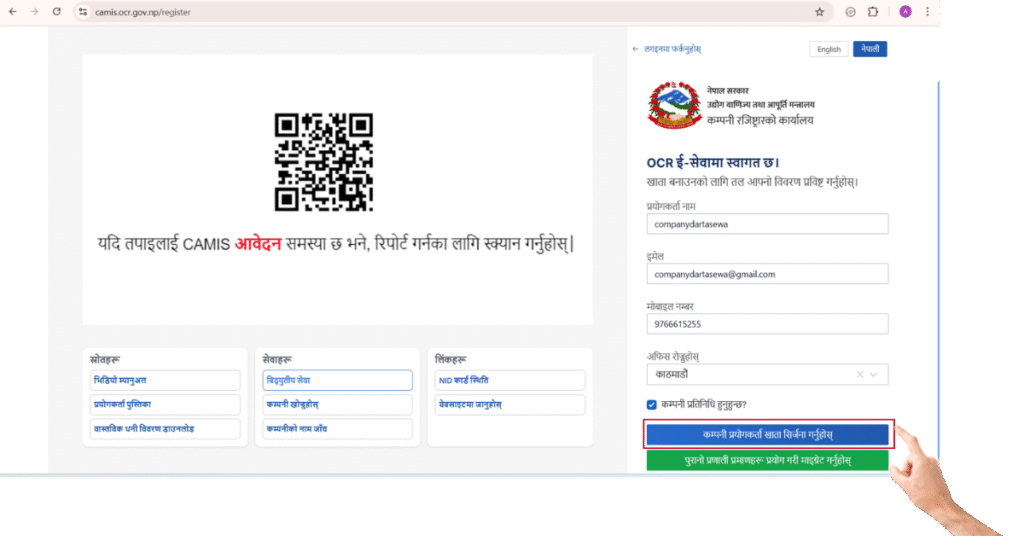
- Fill in the required details. (Username, Email Address, Mobile Number etc.)
- Tick on Are you a Company Representative.
- Click on Create Company User Account.
- Thereafter, you will be redirected to the next page, and an OTP will come to the given mobile number and email address.
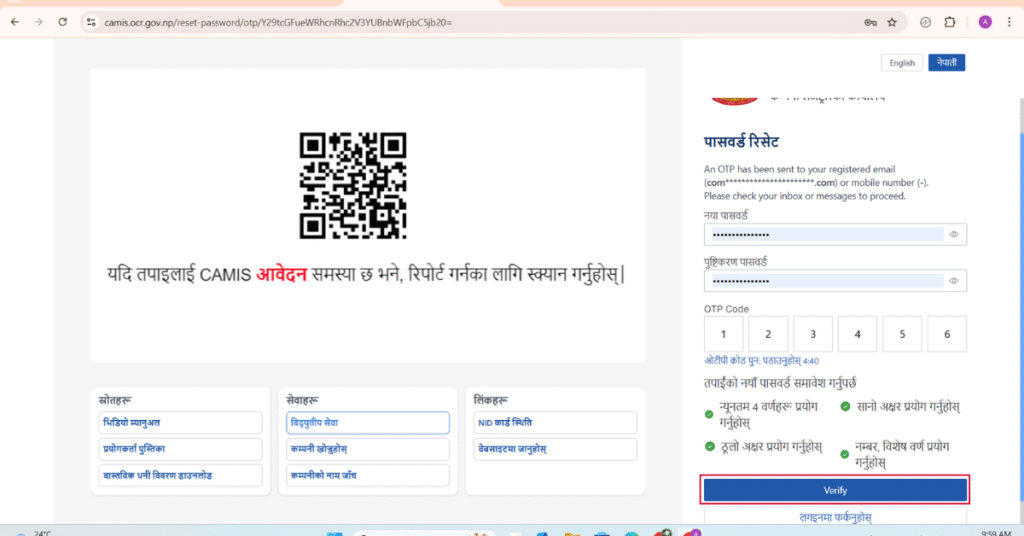
- Enter the correct OTP Code and set a password and click on verify.
- Once the code is verified, your OCR username and password creation is completed.
Application for and Approval of Company Name Reservations:
- The second step is to apply for the company name reservation at the Office of the Company Registrar (OCR).
- Thereafter, the Office of the Company Registrar checks and verifies whether your proposed company name is eligible for reservation or not.
- The Office of the Company Registrar will approve your company name reservation if it is unique and legal.
You have to keep the following things in mind while applying for the company name reservation:
- Decide on the type of company you wish to register: e.g., a Private Limited Company, Public Limited Company, Non-profit Company etc.
- The name must be unique and not similar to already registered companies.
- The company name must not contain numbers. (Example: News24 Media Pvt. Ltd. = Incorrect, News Twenty Four Media Pvt. Ltd. = Correct)
- The company name must be the same in the English and the Nepali languages. (Example: Himalayan Publication Pvt. Ltd., हिमालयन प्रकाशन प्रा. लि. = Incorrect, हिमालयन पब्लिकेशन प्रा. लि. = Correct)
Process of applying for the Company Name Reservation
- Log in to your OCR username account.
- Click on Reserve Company Name.
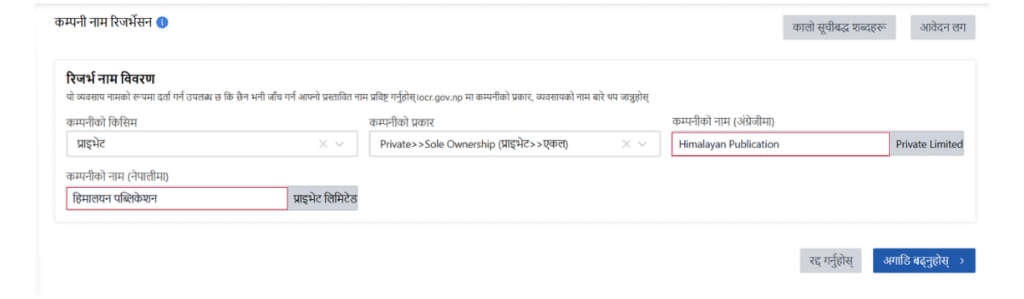
- Fill in the required details of the company and click on next.
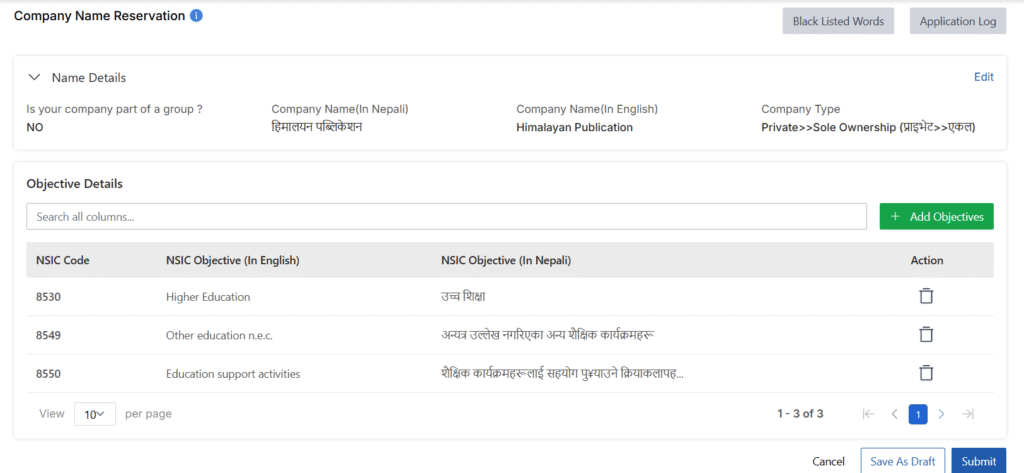
- Add the company’s objectives and click the submit button.
- After that, the Office of the Company Registrar will do the necessary check and verification and approve your application for reserving a company name.
Preparation and Submission the required Documents to the OCR
After approval of the company name reservation, you have to prepare the Memorandum of Association (MOA), Article of Association (AOA), and Company Incorporation Application for the company. You also have to collect the following documents from the company’s shareholders:
- Memorandum of Association
- Article of Association
- Application
- Notarized Citizenship Certificate of Shareholders
- National Identity Document Number (NID Number) of Shareholders
- Personal PAN Number of Shareholders
Once you are ready with the above documents, fill in the required details, upload the documents, and submit it.
Verification and Approval of the Documents
When you upload all the required documents and submit your application to the OCR, the OCR checks and verifies each document. If the uploaded documents are correct, then the Office of the Company Registrar verifies and approves the application.
Payment of Government Revenue Fee
Once the MOA and AOA of the proposed company are approved, the Office of the Company Registrar requests payment of the company registration fee. The government fee varies according to the authorized capital of the company. The government fee is detailed in the table provided below:
Company Registration Fee in Nepal
| S.N. | Authorized Capital | Applicable Fee (NPR) |
|---|---|---|
| (A) Private Limited Company Registration | ||
| 1 | Up to 1,00,000 | 1,000 |
| 2 | 1,00,001 – 5,00,000 | 4,500 |
| 3 | 5,00,001 – 25,00,000 | 9,500 |
| 4 | 25,00,001 – 1,00,00,000 | 16,000 |
| 5 | 1,00,00,001 – 2,00,00,000 | 19,000 |
| 6 | 2,00,00,001 – 3,00,00,000 | 22,000 |
| 7 | 3,00,00,001 – 4,00,00,000 | 25,000 |
| 8 | 4,00,00,001 – 5,00,00,000 | 28,000 |
| 9 | 5,00,00,001 – 6,00,00,000 | 31,000 |
| 10 | 6,00,00,001 – 7,00,00,000 | 34,000 |
| 11 | 7,00,00,001 – 8,00,00,000 | 37,000 |
| 12 | 8,00,00,001 – 9,00,00,000 | 40,000 |
| 13 | 9,00,00,001 – 10,00,00,000 | 43,000 |
| 14 | Above 10,00,00,000 | 30 per 1 lakh of capital |
| (B) Public Limited Company Registration | ||
| 1 | Up to 1,00,00,000 | 15,000 |
| 2 | 1,00,00,001 – 10,00,00,000 | 40,000 |
| 3 | 10,00,00,001 – 20,00,00,000 | 70,000 |
| 4 | 20,00,00,001 – 30,00,00,000 | 1,00,000 |
| 5 | 30,00,00,001 – 40,00,00,000 | 1,30,000 |
| 6 | 40,00,00,001 – 50,00,00,000 | 1,60,000 |
| 7 | Above 50,00,00,000 | 3,000 per 1 crore of capital |
Issuance of Company Incorporation Certificate
After paying the government fee, the Office of the Company Registrar registers the company and issues the Certificate of Incorporation (Company Certificate).
Post-Registration Compliance
After the company’s registration, you have to do several things to operate the business legally. Just registering a company does not allow you to carry out business functions without doing the following things:
- You must register the company PAN/VAT certificate with the Inland Revenue Office (IRD).
- You must open a bank account with the name of the company.
- Obtain a license and approval from any authority if necessary to carry out the special nature of the business.
- Conduct general meetings of the Board of Directors and submit required information to the OCR.
- Complete initial updates and share lagat within three months of the date of the company registration.
Final Thoughts
The process of registering a new company in Nepal is completely online. There is no need to visit the Office of the Company Registrar for company registration. In this post, I have described the step-by-step process of the company registration in Nepal.
If you are interested in registering a new company for your business, please feel free to contact us today, and we will gladly take care of the company registration process for you. We will do all the things and hand over the company registration certificate to you.